2 8 9
Showing posts with label Windows. Show all posts

Monday, 27 April 2015

Stardock CursorFX Plus v2.16 Patch

logo
Stardock CursorFX Plus v2.16
Cursorfx  Plus is a nice software which is used to change the cursor style of a computer, you can put many effects,trails and many other things in your cursor. Stardock CursorFX Plus is a program that lets you use and create incredibly cool looking Windows mouse cursors.
Key Features
  • Includes over 12 anti-aliased 32-bit cursors
  • Easy to use control panel
  • Animated cursors
  • Cursors with normal and pressed states
  • Theme editor to create your own cursors
  • Fully configurable drop shadow
  • Re-sizeable cursors
  • Change cursor colors
  • Motion trail effects
  • Effects on mouse click
  • Brightness and contrast controls
  • Cursor movement smoothing
What’s new in v2.16?
  • Fix for MS Office 365 right click menu not working when CursorFX is enabled
  • Fix for Firefox / Thunderbird where CursorFX prohibited access to menu items
  • Fix for invisible cursor after changing themes
How to Crack?
  1. Download and install CursorFX Plus
  2. Untick “Launch CursorFX”
  3. Close all CursorFX Process if running
  4. Open Stardock CursorFX Plus v2.16 Patch
  5. Click patch and done! :D
*If the cursor not changing, use the Reloader and try re-apply :)
Screenshots
header.CursorFX img1 img2 img3 img4

Downloads
Stardock CursorFX Plus v2.16 (13.8MB) / Mirrors / Mirror 2
Patch Only (1MB) / Mirrors
Manual Crack (325KB) / Mirrors
Reloader (131KB) / Mirrors

EaseUs Partition Master 10.5 All Edition Keys


Ease Us Partition Master
EaseUS Partition Master  is an All In One disk partition management tool brought together with three main functions including: Partition Manager, Disk & Partition Copy Wizard andPartition Recovery Wizard.It allows you to extend partition (especially for system drive), manage disk space easily, settle low disk space problem on MBR and GUID partition table (GPT) disk.EaseUS Partition Master is a full-featured disk utility that is powerful enough to actually be useful.
Features
  • Resize Or Move partition.
  • Extend system drive.
  • Copy disk & partition.
  • Merge partition.
  • Split partition.
  • Redistribute free space.
  • Convert dynamic disk
  • Recover partition
How To Use?
  1. Download and Install the latest Trial version.
  2. Close Ease Us Partition Master from System Tray.-Important
  3. Download, Extract and Open Keys Pack.rar
  4. Select Desired key registry and Open/Install it as Administrator.
  5. Enjoy!
Screenshot

Important
  • Close Ease Us Partition Master from System Tray or the patch will not work.
  • Don’t Update the application, Manually download and install the latest version and use the patch again if needed.
  • Works with the latest version 10.5
  • Trial is same for all editions and Patch will indicate that which edition you want.
Downloads & Links
Official Website Homepage
Compare Editions
EaseUS Partition Master Latest Free Edition direct link [27.90 MB]
EaseUS Partition Master Latest Trial Edition direct link [28.02 MB]
EaseUS Partition Master 10.5 All Editions Keys Pack [4 KB] | Mir

Tuesday, 21 April 2015

Stardock Start8 + Win10 Support Patch

logo
Stardock Start 8 1.5 – Your New Windows 10 Start Menu!
Stardock Start8 lets you return the Start Button to Windows 8 (and 10). Microsoft Windows 8 is shipped without the “Start” menu. Start8 brings back Windows 7-style Start menu with Windows 8 enhancements. Also you can view and launch installed applications (including Modern apps), All Programs menu. Start8 includes support for “jump lists”/recent documents for recently accessed programs (Devices, Documents, Music, Videos, Photos, Computer, and more).
Pin favorite desktop and Metro apps shortcuts directly to the start menu for easy access. Start8 adds searchable Windows 8-style (Modern UI) Start menu options for Windows desktop applications, Modern applications, and documents. It allows automatically load directly to your Windows desktop on login (vs the start screen). In addition, you can also easily shutdown your PC without needing to access another menus.
Features
  • Windows 7-style Start menu with Windows 8/10 enhancements
  • Pin desktop and Modern UI apps
  • Jump list support
  • Unified Search for Apps, Settings and Files
  • Boot directly to the Windows 8/10 desktop
  • Automatically matches the color of the taskbar
  • Skinnable Start button
  • Windows 8 Start screen accessible from the Start Menu
  • Optionally disable the Windows 8/10 desktop “hot spots”
  • Adds option for WinKey to show full screen metro desktop
  • Group Policy support
Changelog
  • Added support for sleep function on Surface 3 and similar devices.
  • Added option to access a list of modern UI applications from the Start8 Start menu.
  • Updates for compatibility with Windows 10 Tech Preview
  • Updates for latest activation binaries
  • Added new SAS activation and trial code
How to Install?
  1. Download and unzip archive
  2. Install it
  3. Install Start8 and copy patch to folder where Start8 is installed.
  4. Open Windows Search and search for services.msc
  5. Stop the Startdock Start8 service, change its startup mode to ‘Disabled’.
  6. Log out of the Windows and re-log in, then run the Patch and click the ‘Patch’ button.
  7. Start back the service, change the startup mode to “Automatic” again and log out and re-log in once again.
  8. Enjoy! 
Screenshots
7 (1)
6 (1)


Stardock Start 8  |  Mirrors

Monday, 20 April 2015

PhotoScape 3.7 free


 PhotoScape is a fun and easy photo editing software that enables you to fix and enhance photos.
To install Photo Scape 3.7 oPhotoScape is provided free of charge.
  They always upgrading PhotoScape.
SYSTEM REQUIREMENTS:
(Microsoft Windows NT/2000/XP/Vista/7/8)
If you are a user of Windows 98 or Me, please use PhotoScape 3.4
If you are a Mac user, use PhotoScape X for Mac and VideoBlend for Mac n your computer

What's new
  • Added 'Black & White' and 'Bandicoot' filters (Editor > Home)
  • Added a 'Smart Blur' brush (Editor > Tools > Effect Brush)
  • Brush sizes increase from 3 to 4 and become bigger.
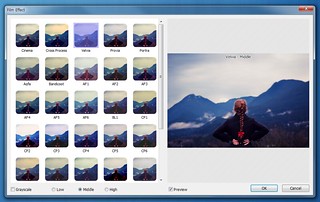
  • Added 29 more film effects so totally 35 film effects now. (Editor > Home)
  • Improved the 'Film Effect' UI
  • Improved Editor, Page, Combine and AniGif UI
  • Fixed minor bugs

screenshots


BlueStacks App Player 0.9.20.5213 MOD [Offline]

BLUESTACKS
BlueStacks App Player
BlueStacks HD App Player Pro is a plateform that allows you to run applications, including games written for OS Android – on desktops, laptops and tablets and also this package contains all files to install it offline. This is a special program that uses a technology called LayerCake, which provides the correct environment for running applications for ARM-Android on a computer running Windows. Get Root (right super – user).
After you install BlueStacks on your Windows PC, you can download directly from the program needed Android-app, without having to use the Android-based smartphone. BlueStacks looks pretty neat and fits naturally into the interface Windows.
Features List
  • Run Android applications in full-screen and not only.
  • Through the cloud download your application from the phone to Windows.
  • In 16 player preinstalled applications and you can play them if there is no number.
  • Ability to set an unlimited number of applications.
  • Ability to play 3D games (cache).
  • You can set a home screen (Launcher) to replace the standard, etc.
  • Sync with your Android device will allow you to make calls, send SMS, take pictures and more.
  • Has a lot of settings and system settings Android (Although they are slightly trimmed)
  • Knows how to install applications from a computer at the touch of them
  • Ability to obtain Root (full access to the file system, etc.)
  • You can set Google Play, simply speaking market.
  • BlueStacks great friends with ADB is a very big plus, if you really want, you can change the firmware.
  • Ability to turn in FastBoot and Recovery.
  • BluesStacks has virtual disk, such as SD Card, Data, and a few others. Which again gives you the opportunity to do a lot of “body” motions with it and enjoy all its charms.
  • Ability to obtain Root (full access to the file system)
What’s New ?
  • Major bug fixed with enhanced performance
Older Cracked Version Info
  • Simple Launcher Interface
  • SuperUser Support
  • SuperSu Support
  • Import Windows Files directly from your PC to bluestacks
  • Root Explorer Support
  • Advanced Calculator Support
  • Clock, Camera, and other accessories support
  • Root Checker Support
  • Build in Media Player which run mp3, mp4 and many other formats easily
  • Many more…
How to Run Speed Up BlueStacks ?
  • Press Start Button with “R” Key [image]
  • Search the regedit in newly opened windows [image]
  • Click on HEKY_LOCAL_MACHINE >>> SOFTWARE [image]
  • Then select Bluestacks >>> Android >>> Hit enter on Memory and replace 300 to 600; then click on decimal and click “OK” [image]
  • That’s it; you will have successfully speed up your bluestacks
How to Install?
  • Extract winrar files and run given app as an administrator
  • Just wait and follow the instructions during installation of setup into your PC
  • After Completing the installation; Bluestacks will automatically launch; just select some options which will appear on screen
  • That’s it. Now run your all apps which supports the Android 4.4.2 and earlier. :)
Screenshots

Requirements!
  • To run 3D games need support virtualization technology Intel® VT-x or AMD-V ™
  • To install the BlueStacks need a video card that supports OpenGL 2.0 or later
  • To start BlueStacks need about 1GB of RAM, otherwise you run the risk of “infinite loading”.
  • For optimum performance, BlueStacks is highly desirable to update your graphics card drivers
  • NVIDIA – (WHQL – certified, stable drivers. Beta – unstable, but can increase in speed)
  • AMD RADEON – (Download drivers – Category components: Desktop / Notebook Graphics)
  • INTEL – (family of products: graphics adapters)
Downloads
BlueStacks App Player 0.9.20.5213 MOD (267.9 MB) | Mirror 1 | Mirror 2 | Mirror 3
OLDER STABLE VERSIONS
BlueStacks App Player 0.9.17.4138 SuperUser Support MOD (250.8 MB) | Mirror 1 | Mirror 2 | Mirror 3
BAP 0.9.15.5208 MOD [Offline] (257.2 MB) | Mirror 1 | Mirror 2 | Mirror 3 | Mirror 4
BlueStacks App Player 0.9.7.4101 SuperSu Support MOD (252.9 MB) | Mirror 1 | Mirror 2 | Mirror 3
BlueStacks App Player 0.9.7.4101 SuperUser Support MOD (253.1 MB) | Mirror 1 | Mirror 2 | Mirror 3

Google Chrome v42 Build 2311.90 Offline Installer

Google Chrome 
Google Chrome 42 is a fast and easy to use web browser that combines a minimal design with sophisticated technology to make the web safer. It has one box for everything: Type in the address bar and get suggestions for both search and web pages. Will give you thumbnails of your top sites; Access your favorite pages instantly with lightning speed from any new tab. Google Chrome is an open source web browser developed by Google. Its software architecture was engineered from scratch (using components from other open source software including WebKit and Mozilla Firefox) to cater for the changing needs of users and acknowledging that today most web sites aren’t web pages but web applications. Design goals include stability, speed, security and a clean, simple and efficient user interface.
Features
  • Sandboxing.  Every tab in Chrome is sandboxed, so that a tab can display contents of a web page and accept user input, but it will not be able to read the user’s desktop or personal files.
  • Google say they have “taken the existing process boundary and made it into a jail”. There is an exception to this rule; browser plugins such as Adobe Flash Player do not run within the boundaries of the tab jail, and so users will still be vulnerable to cross-browser exploits based on plugins, until plugins have been updated to work with the new Chrome security. Google has also developed a new phishing blacklist, which will be built into Chrome, as well as made available via a separate public API.
  • Privacy. Google announces a so-called incognito mode claiming that it “lets you browse the web in complete privacy because it doesn’t record any of your activity”. No features of this, and no implications of the default mode with respect to Google’s database are given.
  • Speed. Speed improvements are a primary design goal
What’s New
  • A number of new apps, extension and Web Platform APIs (including the Push API!)
  • Lots of under the hood changes for stability and performance
  • The answer to life, the universe and everything
How to Install ?
  1. Download & Install Google Chrome From The Links Given Below
  2. Done
Screenshot


Google Chrome v42 Build 2311.90 32-BIT Offline Installer (40 MB) / Mirror
Google Chrome v42 Build 2311.90 64-BIT Offline Installer (45 MB) / Mirror

Friday, 17 April 2015

YTD – YouTube Downloader Pro 4.8.9 Crack


YTD Logo by VRG
YTD – YouTube Downloader Pro
YTD Downloader is software that allows you to download, convert and play videos from YouTube, Google Video, Yahoo Video, and most everywhere else too. The program is easy to use, just specify the URL for the video you want to download and click the Ok button! It also allows you to convert downloaded videos for Ipod, Iphone, PSP, Cell Phone, Windows Media, Xvid and MP3. You can use YTD Downloader to download the videos of your choice from home, at the office or in school. Download YTD Downloader now and get started downloading your favorite videos from YouTube. The YTD YouTube Downloader is 100% CLEAN, which means it does not contain any form of malware, including but not limited to: spyware, viruses, trojans and backdoors.
How To Crack?
  1. Download And Install Software.
  2. Download And Run Patch.
  3. Click Patch Button.
  4. Done!
Screenshot


YTD Latest Setup & Patch (11 MB) / Mirrors

Thursday, 16 April 2015

CCBoot v 3.0 2015 Serial Key

icon
CCBoot
CCBoot is a powerful network boot software that allows you to operated computer without a local disk. By using CCBoot you will saves you disk space in a very easy and convenient way, control all computer in a single click, and also restore a clean system (clear of viruses and trojans) after each reboot. CCBoot will boot the system from a remotely located machine using connected hard drive over a network and convergence of the rapidly emerging iSCSI protocol with PXE diskless boot technology. CCBoot also allows all client computers with different specifications use only one boot image which will reduce the workload for network administrators.
Features
  • Best cache performance for all clients
  • No need for hard disk on client PCs
  • One click updates on one client PC
  • Support for physical memory and SSD cache
  • Virus and trojan free by restoring to original state
  • Works with Windows domain, and so much more.
How To Register
  1. Download Setup & Serial Key From Given Link.
  2. Run Setup And Choose your installation type [Image].
  3. Run CCboot & configure it [Image].
  4. Now When you done configuration it will open up main window.
  5. Click on Help > About & Register [Image].
  6. Now Register Using Serial Key [Image].
  7. Done Its Registered !!!! Enjoy !!!!
Screenshot
registered

CCBoot v3.0 + Serial Key.rar (21 MB) | Mirror

Debenu Quick PDF Library 11 Serial Key

3
Debenu Quick PDF Library 11
Want to create, render, print, secure, merge, split and manipulate PDF files with just a few lines of code on Windows, Mac and iOS? Enhance your capability with Debenu Quick PDF Library: a powerful, royalty-free developer PDF SDK for adding PDF functionality to your applications. With more than 900 functions for use with C, C++, C#, Delphi (version 4 to XE7), Objective-C, Swift, Python, PHP, Visual Basic, VB.NET, ASP, PowerBASIC, Pascal and more – it’s like your ultimate PDF toolkit. Used by developers of all levels working with PDFs, it’s specifically useful for getting products to market faster. It includes a robust API, and is available in a variety of different editions for use on Windows, Mac and iOS. Purchase options include: single developer license, multiple developer license and source code license. Debenu Quick PDF Library is licensed on a per developer, per platform basis. Support is included for the most common programming languages. Work smarter and faster today with Debenu.
Features
  • Create, render and print PDFs
  • Secure, sign and protect PDFs
  • Create, fill and edit PDF forms
  • Split, merge, append and combine PDFs
  • Convert EMF to PDF (Windows only)
    Extract text and images from PDFs
  • Work with PDF Layers
  • Edit initial view and document properties of PDFs
  • Add text, images and barcodes to PDFs
  • Advanced support for JavaScript, bookmarks, vector graphics, geospatial PDF
  • Direct access functionality (load files from disk, not memory)
  • Annotations, bookmarks and links for easy navigation
  • Create Windows and Mac applications
System Requirements
  • Desktop
Windows XP, Vista, 7, 8 and 8.1 . 32-bit and 64-bit.
Mac OS X 10.5 to 10.9.
  • Server
Windows Server 2003, 2008 and 2012. 32-bit and 64-bit.
Mac OS X Server 10.5 to 10.9.

iOS
ARMv7s = iPhone 5, iPhone 5c, iPad 4
ARMv7 = iPhone 3GS, iPhone 4, iPhone 4S, iPod 3G/4G/5G, iPad, iPad 2, iPad 3, iPad Mini
ARMv6 = iPhone, iPhone 3G, iPod 1G/2G
How to Install?
  1. After download, install it by default
  2. Register with your name
  3. Insert serial number
  4. Finish installation
Screenshots
27
26


Debenu Quick PDF Library 11  |  Mirrors

Freemake Video Converter 4.1.6.2 Universal Keygen

Capture
Freemake Video Converter
Freemake Video Converter is allinone multimedia converter that allow you to convert video, audio, dvd and photo from one to another formats. Freemake Video Converter support for
most popular multimedia formats such as *.mp4, *.mp3, *.mkv, *.png, *.jpg, *.3gp, *.wmv, *.avi, and many more. In addition to the features of multimedia converters, this software also can be used to create slideshows, videos editor, and videos downloader. In this package, we have included Freemake Video Converter 4.1.5 with Keygen, so you would be easily to unlock the Freemake Video Converter Gold Pack and also Subtitles Pack features.
Freemake Video Converter Gold Pack Features
  • Black bar removal
  • Exlusive DVD menus
  • Automatic Backup
Freemake Video Converter Subtitles Pack Features
  • Add subtitles to your movie
  • Change subtitles font
  • Edit subtitles size
How to install
  1. Disconnect from internet
  2. Install Freemake Video Converter
  3. Register with keygen
  4. Enjoy Freemake Video Converter Full Version
Screenshots
ii


Freemake Video Converter 4.1.6.2 Trial Download | Mirror (27 MB)
Freemake Video Converter Univarsal Keygen | Mirror 

Wednesday, 15 April 2015

Stardock WindowBlinds 8.0.5 [Latest] Keygen! [Updated]


Stardock WindowBlinds 8.0.5
WindowBlinds is a software utility that allows you to completely change the look and feel of Microsoft Windows. It works by applying new visual styles, called skins, across the entire user interface (title bars, push buttons, start menu, taskbar, etc.) of the operating system. As a result, you gain complete control over the way Windows looks. As good as someone might think Windows looks, it is a one-size fits all solution. WindowBlinds gives users thousands of new looks to choose from.
Thanks to Team RNDD for the patch!
How to Crack ?
  1. Download & Install WindowBlinds 8 (If you already installed then Re-Install it)
  2. Use task Manager to close “WB8Blinds”
  3. Copy patch to Installation folder (C:\Program Files\Stardock\WindowBlinds)
  4. Run the Crack as Administrator.
  5. Click Save License then click ‘Patch’ button
  6. Run WindowBlinds 8 
 screenshots


Stardock WindowBlinds Homepage
WindowBlinds 8  official trial setup + patch.rar (45.52 MB) / Mirrors
Patch / Mirror

Stardock Fences v 2.12.613 Full Version Patch

images
Stardock Fences
Fences helps you organize your PC by automatically placing your shortcuts and icons into resizable shaded areas on your desktop called fences. Its many customization features are what make Fences the world’s most popular Windows desktop enhancement.
Features List
  • Use your desktop to organize all of your stuff
  • Keep your desktop clean
  • Rope off your desktop
  • Automatically arrange your desktop
  • Make your desktop a portal to your files
  • Windows 8 support
Whats new in v2.12.613?
  • Added allowing users to choose between rounded and 90 degree angle corner edges in the Fences config (defaulted by OS)
  • Added prompt for email at trial activation
  • Re-enabled touch features. This includes using two fingers to switch between desktop pages (enabled by default) and the ability to “flick” icons into fences (disabled by default). Both are options in the settings, on the “Desktop Pages” and “Layout and snapping” tabs respectively.
  • Fixed Fences not showing on desktop/exist offscreen, out of res bounds
  • Fixed Fence shifting icons into hidden third column
  • Fixed show my desktop issue reactivated with information
  • Fixed issue with Folder portals and visibility
  • Fixed issue with name based rules and right click
  • Fixed issue with bottomed aligned secondary monitors causes off-set Portal Fences
  • Fixed a crash issue that has been haunting support where a target folder location had been changed
  • Fixed issue with config UI blanking out
  • Fixed issue with Fences not showing on desktop when they existed offscreen, out of the screen resolution
  • Fixed issue with new files defaulting to the second monitor
  • Fixed issue with the show desktop button in Windows when an active modal window was displaying in Fences
  • Fixed issue with being unable to drag desktop pages when the taskbar was on the left or right
  • Fixed issue with excluding icons from quickhide (like .website)
  • Fixed issue when folder portal opacity was set to 0%
  • Fixed where rules weren’t sticking if assigned through right-click/…
  • Removed Fences as a Control Panel item (kept causing problems)
 screenshots


How to Crack?
  1. First of all, you need to install and crack the old version of Fences, v2.01 [Link]
  2. After you have done the first step, download and install Fences-2.12_setup.exe in the same folder as the old Fences installed.
  3. Run Fences v2.12 Patch.exe as administrator.
  4. Browse the installation path of Fences.
  5. Click patch and enjoy full version of Fence v2.12 :)
Screenshots


Stardock Fences v 2.12 & v2.01 Setup+Patch (22MB)   /   Mirrors